


SMS Notifications from HACCP Builder
HACCP Builder sends text messages to employees of food-safety facilities that use our software. These are work notifications only. We do not send marketing or promotional texts.
How you opt in
Your employer’s facility manager adds your mobile number to HACCP Builder, for work alerts, after you give it to them. The first message you receive asks you to reply YES to confirm. You receive no other messages until you reply YES. If you do not reply YES, you receive nothing further.
The first message reads: “HACCP Builder: [Facility name] added this number for work alerts (log reminders and out-of-range alerts). Msg frequency varies. Reply YES to confirm, STOP to opt out, HELP for help. Msg&data rates may apply.” After you reply YES, you receive one confirmation: “HACCP Builder: You are confirmed for work alerts from your facility. Msg frequency varies. Reply STOP to opt out, HELP for help. Msg&data rates may apply.” Agreeing to receive texts is optional.
Where a facility manager adds the number
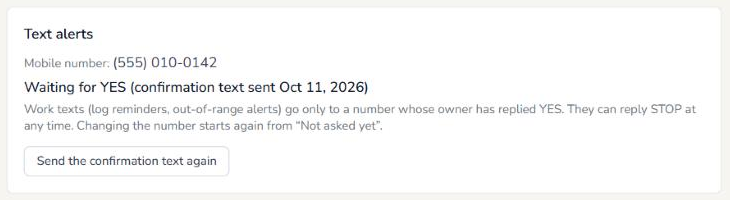
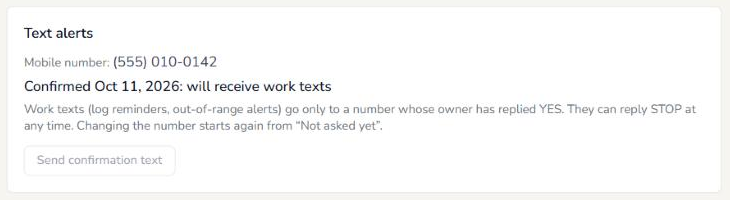
In HACCP Builder, the facility manager opens an employee’s login and types the person’s number into the box labeled “Mobile number (for text alerts).” A “Text alerts” card then shows where that person stands: Not asked yet, Waiting for YES, Confirmed or Stopped. The manager can send the confirmation text from that card. Alerts are then switched on one log or check list at a time for each login, and work texts go only to a number whose owner has replied YES. Changing a number starts the confirmation again. The screens below are from a demonstration account with a made-up number.

What we send
Reminders to complete scheduled food-safety logs and check lists, and alerts when a record is out of range. Message frequency varies with your facility’s schedule.
Example messages
HACCP Builder: Your Freezer Log is due by 8:00 AM. Reply STOP to opt out, HELP for help. Msg&data rates may apply.
HACCP Builder: A temperature reading was out of range. Please review and record a corrective action. Reply STOP to opt out, HELP for help. Msg&data rates may apply.
Opting out and help
Reply STOP at any time to stop receiving messages; you will get one message confirming you are unsubscribed, and you can reply START to rejoin. Reply HELP for help, or contact support@haccpbuilder.com or (866) 577-4030 ext. 800.
When you reply HELP, you receive this message: “HACCP Builder: Work alerts from your facility’s food-safety software. Msg frequency varies. Msg&data rates may apply. Reply STOP to opt out. Help: support@haccpbuilder.com or (866) 577-4030 ext. 800.”
Message and data rates may apply. Carriers are not liable for delayed or undelivered messages. We do not sell or share mobile numbers or SMS consent with third parties for marketing. See our Privacy Policy and Terms of Service.
HACCP Builder is operated by HACCP Builders, Inc., registered office 186 Washington Street, Saint Paul, MN 55102. Questions about these messages: support@haccpbuilder.com or (866) 577-4030 ext. 800.